The title pretty much says it all. I took a camera and recorded using the excavator to do some work on the yard. It took hours and I encountered the problems we all have with cameras. Soft focus, knocking over the tripod, pointing it the wrong way... You know the drill.
After hours of recording, I started to respect those Youtube creators even more.
You have to go through the recording, pick the stuff out that makes sense and was actually worth a crap, compose it into something that might be interesting, and then go through the process of putting it online. A whole lot of trouble to convey an idea, but it turned out to be fun.
I see an opportunity here to expand the blog by including other media.
Here's my first effort at this. It's short but represents a heck of a lot of work.
Wednesday, July 6, 2022
A Guy I Know Suggested using Youtube

Tuesday, June 21, 2022
So, Have I Actually Done Anything With That Expensive Toy?
Well, yes, but not as much as I would have liked. The 2022 heat wave hit here in Arizona and it was over 110F every day until today. However, today I had to repair my chainsaw instead of working with the excavator.
Sigh....
But I have managed to do some things around the house. I moved a whole lot of rocks out of the way, Built a little road to get around, dug out some brush, and that kind of thing. I know that I'm preaching to the choir here, but tools are great to have. I think I mentioned that I bought it because I was tired of renting equipment and having a multi-hundred dollar bill when I returned it. You can't get good with it only spending a few hours under pressure, and you never quite get the entire job done.
I wanted my own, and indulged myself and bought the darn thing. I don't regret that decision.
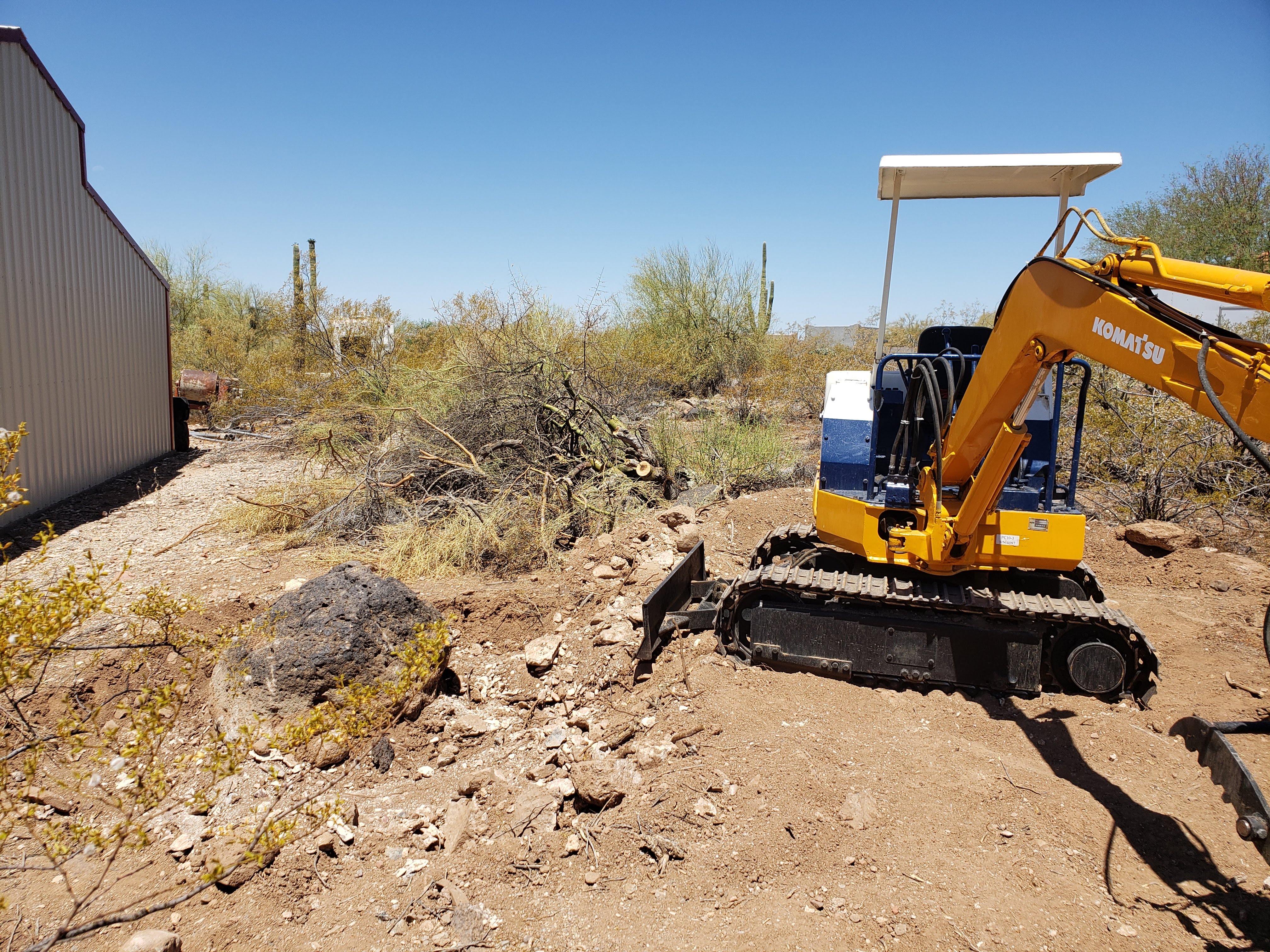
If you consider following my path, I have a few recommendations:
1. Don't get too big a machine. My Ford tractor is huge and very powerful, but it doesn't fit anywhere. I have to jockey that thing around a LOT to position it for work. Then, when I have to move it, I have to be careful not to take out a fence or something.
2. Excavators are fun and they can pick up heavy things. However, you have to have a thumb to do it easily. You can drag a bucket across the ground and a rock will just slide along avoiding the bucket like it suddenly became sentient and decided not to cooperate. A thumb solves that problem. Thumbs are also really good for picking up brush and moving it.

3. Avoid all the fancy electronic bells and whistles. Sure little short joysticks are fun and cool looking, but the damn things break leaving you with a machine to fix. The electronics on these machines have to be able to take the heat, cold, rain, mud, etc and cost a lot.
Simple hydraulics are the best for people like me. I want to use the machine, not order parts for hundreds of dollars and wait forever for them to arrive. Hydraulic parts are simple and available all over the place.
4. Get an older machine. One from the '80s won't have a mess of equipment to lower emissions. A friend of mine had his brand new tractor in the shop for a month to get the emissions equipment working correctly. Avoid that dilemma if at all possible.

5. Diesel may be expensive right now, but it stores well and doesn't explode. Get a diesel engine on your new tool. They run cooler, last a long time, and are already fuel injected. Great little motors that don't plug up with gum from ethanol additives that dissolve gaskets. Remember above where I mentioned having to fix my chainsaw? Yep, the ethanol dissolved the gaskets in the carburetor.

6. Educate yourself about the common problems. This is something that you can't get from youtube. People let their machines set outside in the weather and the hoses rot. Hydraulic hoses are not cheap and most of them are custom-made. These things will drive you nuts on a machine that hasn't been used in a long time. If you check back on this blog you'll find where I rebuilt cylinders on the garage floor. It can be done, but that means you're fixing it instead of using it.
For most people, a 4000-pound machine will do everything they want to do with it. It can lift several hundred pounds and move it around. Trailers are cheaper for them. I picked up a used tandem trailer that will carry it just fine locally without any trouble.
Unfortunately, they can be a black hole for money. There are attachments that can make everything easier, but they cost big bucks. A grooming bucket that lets the dirt go through while the bigger rocks get stuck is great for clearing rocks, but they cost hundreds. Consider digging a hole and scraping the rocks into it with the claws instead. A quick-connect so you can change the buckets easily is great to have, but have you looked at how much they cost? You can pound a different bucket in place for a lot less money. A smaller or larger bucket is great to have, but unless you find one abandoned in an empty field, it's gonna cost you a bunch. Sure you can build one and that would be fun, but have you looked at the price of quarter-inch steel lately? Welders are getting cheaper, but steel isn't.
I love my excavator and it has made things possible that simply weren't before, but I must discipline myself constantly to keep the urge for a new item for it under control.
For me, being able to climb up on it anytime I want to and tear out a cactus is exhilarating. Not having to reserve it at an equipment rental place and picking it up at 7:00 AM from a clerk that hasn't had enough coffee is worth a lot. Let's not talk about getting it back on time. That really sucks.
Of course, my yard is starting to look like a used farm equipment lot !

Tuesday, April 5, 2022
My New Excavator
Yes, I bit the bullet and bought a Mini Excavator.

There were a lot of them out there, but buying something this expensive sight unseen was scary. Sure, people do it every day at online auctions and such, but they know what they're doing, ... I don't.
So, I went to ebay and looked at their guarantee for construction equipment. They insure the purchase up to $100,000, and that gave me enough courage to contact a seller. The rest was easy. The excavator arrived in port in Long Beach, CA; was inspected; loaded on a truck, and showed up at my house in just a few days total time. I was lucky in that respect, but I did choose a machine that was available instead of looking for exactly the right thing.
If you want to know the specs, the model number is right on the side and google can pop up a spec sheet in one search. What I like most about it is there ARE NO ELECTRONICS; it's old school hydraulics with valves and such. It can be worked on without a laptop plugged into a data port. Less failures to some component getting wet and less expensive control components.
I can fix it if I need to. (or should I say 'when')
Now the bad stuff: When I got on it, having exactly zero experience on an excavator, I couldn't get it to go. Meaning, how the heck do you run this thing? I fiddled around and found the two forward controls for the tracks and managed to move it down the drive a ways. Then I looked at the control layout decal and managed to work it a bit. I got it from the road to my house in a few minutes and then started to play with it where no one could see me make a fool of myself.
After an hour of trying levers, looking at the instructions (shudder) and messing around I managed to make it do things. Then, I went nuts. Spinning around using zero turn, swiveling it around and around, banging the bucket on the ground. Basically playing with my new toy.
It is so exciting to pick up a bucket of dirt, swivel around and dump it behind you. That is probably the most exciting thing about an excavator I've tried yet. It can really dig!! I can make a hole in no time, even with the incredibly rocky ground I live on. Just wiggle the bucket back and forth a little and it will bite in. Really large rocks give it trouble, and I have to plan better to roll them out of the hole, but so far, I haven't hit one that I can't move. I know I will at some point (it is a mini machine), but then I'll just go around the rock if necessary.
And, it has a THUMB. In case you don't know what that is, here's a picture of mine.

This allows me to pick up rocks, grab a bunch of prunings, pick up a limb to chainsaw, etc. It gives me a hand to manipulate things with. This increases the versatility of the machine to a level that we, as homeowners, can really appreciate.
There is one annoying thing about it though. The left hand control is set up counter-intuitively. Left hand left is stick away and left hand right is stick close. Left hand forward is swing right and left hand back is swing left. There are two control standards in the US, ISO and SAE; they differ in the positions of the controls, however both of them have the swivel control on the left hand side to side. That is driving me nuts. I keep swinging the excavator when I try to move the stick. It just makes sense to my brain that swivel left should be push left, not pull back.
Yes, it can be changed by moving the hydraulic lines. However, the lines are plumbed, not hoses. Take a look:

What's also awesome about this machine is how well it is set up. I can get to the controls really easily, the gas gauge is a clear tube instead of a float in the tank that fails, the horn is not where you'll hit it every time you use the machine. It even has a light that I plan on using very, very little.
For example, the horn used to be on the right hand control where you manipulate the bucket and bang your knee. It's now on the right hand side where the other electrical controls are:

I may grind that mount off at some point, but want to have a can of Komatsu blue paint on hand when I do to keep it pretty.
Wanna see the extremely high tech fuel gauge? I guarantee this will not fail due to a rat eating the wiring or some connection coming loose.

Yes, it's just a clear tube that shows the level of fuel in the tank. No electronics, no silly idiot light, just something that you can easily see that won't fail as soon as you need it.
As soon as the wire showed up as pending for transfer, he called the shipper and they came and loaded it up. I got it the next day.
Totally seamless transaction; nothing went wrong and the machine started on the first try. How good can it get?
Ray will probably read this blog post and snicker a bit because I literally drove him nuts with questions about the dates, how wire transfers worked, etc. All the stuff a naive purchasers comes up with. I was basically a total dweeb, and he put up with it.
If you're interested in something like this, visit his web site at https://www.ngollc.com/ and tell him Dave sent you. You won't get a discount, large equipment doesn't work that way, but he'll recognize the name.
I'll be posting about my exploits with this machine in the future. It's too much fun not to spend time on it.
Tuesday, November 2, 2021
My Experiences With the Hubitat
I mentioned last post how I got talked into trying the Hubitat. To be honest, it didn't take too much convincing because the hub works with the old Iris switches and I have several of them. We home automation freaks loved those switches. I hacked into them and made them work without the Lowe's hub and hooked them into my house to measure power and control several things.
Then Lowes dropped support for the devices and closed down their cloud offering leaving everyone that depended on that service in the lurch. See why I don't like to rely on cloud services? We've seen this over and over again for the last two decades. You sucker into a service and then they raise the price, lower the capabilities and finally shut it down. That's happening right now with the ring devices. I have one I got simply as a way to watch my driveway for deliveries. Then I got another for a replacement doorbell. They're fun, but require a subscription and an app.
Ring just announced that they're dropping the Windows 10 App and going to a web site instead. I wonder what they will drop next because they already raised the price on their subscription earlier this year. I really feel sorry for the huge number of people that are subscribing to these services without knowing what will eventually happen. I went in with my eyes open because I wanted to play with the devices, but I fully expect them to be an eventual waste of money.
Back to the Hubitat. This thing worked for the Iris switches I have on the very first try. It was really easy to set up and get going, but it didn't fulfill my needs for monitoring things and storing data long term. No, I didn't hack into it and write code, I didn't need to. The developers made this thing easy to hack into and extend the basic capabilities. They actually encourage this. Yes, you can add source to it and customize the heck out of it, but that will have to wait until I have more time to play with the various nuances of the device.
I started off simply with an Iris switch I controlled, added a clock because it was cool and then my power usage from my fridge in the kitchen.


Don't let anyone tell you these can't be any good; both of these worked first try and have been working reliably for a few months now. When I first hooked them up, I called them CS1 and CS2 for "Cheap Switch" 1 and 2. They are available all over the web and serve as Zigbee endpoints. They don't route, so they can't extend a network, but there are other ways to do that.
I'm really impressed by the progress home automation has made in the last couple of years.
Darn, this was going to be a huge hunk of work.
Sunday, October 24, 2021
Hard to believe it's been over a YEAR
Since my last post. Did anyone notice?
I've been heavily involved in local politics in my area for over three years now and it finally came to an end. My side lost....
During this time the home automation field exploded. There are things available now for less than $20 that I had to build from whatever was available. Maybey it's time for me to catch up with the world again. So, following the advice of a friend, I bought a Hubitat. "Why that particular hub." you ask? Well, it doesn't require the internet to work; it isn't dependent on some cloud service; and just might fill the bill for home automation out in the sticks where the internet goes away and runs slow. Besides, I don't like the idea of some cloud service having my house data at their disposal.
And, since a subscription isn't needed, it's cheap.
When it arrived from Amazon, it was in a box about 6" square. This thing was tiny. Roughly 2" by 2" and less than an inch tall, it was smaller than a Raspberry Pi and would fit anywhere I wanted to put it. Cool. In the picure below, it's the little thing with the green light.

Now to follow the directions printed in 2 point type on a folded business card to see if the thing worked. It did on the first try. This is the device that took over where Lowe's left off when they dumped the home automation business and I have a few of those early Zigbee devices around the house working (another reason to pick this hub). So, I paired one of them up with the hub, and that also worked first try.At that point I dug into their documentation, created a 'Dashboard', and stuck a 'Tile' on it and tried to turn the Iris switch on remotely. That worked first try!!
Oh my goodness, I didn't have to hack into it by searching through a hundred pages of documentation and prowling the web for any hint of how to make it work. It just worked. This was going to be fun.
I hooked the rest of my Iris devices into it and moved much of my lighting controls over to it immediately. This is where the fun begins ....
I had to learn a little about apps, drivers, odd interfaces and an editor that is both brilliant and clumsy at the same time. A "Rule Machine" that (to me) defies logic and menus that go on, literally, for pages and pages.
But, the device works, it does the job.
Of course, this made my internet (one of the banes of living semi rural) really look bad. The very best I can get with Century Link DSL in my area is 5MB. Yes city dwellers that are hooked to fiber that easily goes a full GB, there are still people suffering along at that speed. Fortunately, we have (finally) other providers now. I chose one called Teknet that uses radios scattered around the area and powered antennas on the roof as my new provider. A bit more expensive, but I could get 30MB out here and that is a darn sight better than the 5 I've been putting up with for well over a decade and a half.
Thus, a new internet provider, a new device, a house that has been running on outdated, but extremely reliable equipment for a very long time would lead me into new adventures that might be fun.
More, and greater details in the days, weeks to come.
Wednesday, February 19, 2020
Temperature adventures with (RaspPI) ESP32 and MQTT.
Temperature measurement.

},
NOTE:
MQTTfx:


Sunday, January 5, 2020
Introduce End Devices to a Network and Introduce Problems
I described what the problem turned out to be back then <link> and moved to a more directed network using API mode to control the traffic level and increase the speed of throughput. That all worked really well. Then I created the room temperature monitors. They were created as battery operated devices since I wanted to put them in places where there was no power; XBee routers use too much power for such an application, so they had to be XBee End Devices.
That was the beginning of a long time problem that I simply couldn't find, and has driven me nuts a few times before finally getting the entire mess to work again.
The symptom was that a device would leave or get kicked off the network and then simply refuse to join back in. I'd go for a few days and a sensor would leave and no amount of resets, power cycles, slaps or flights across the room would get it back on the network. Hell, I even programmed another XBee and put it in the same place and it wouldn't work. Then, seemingly at random, it would connect and start working all by itself.
Months of watching the XBee traffic after adding a ton of logging to almost every device in the house led me to nothing at all. Reading every blog and question remotely related on the web told me nothing. I was completely baffled by this problem.
Some of the things I tried were to automatically reset the network to force it to reform using the NR=1 command. This dumps all the routing tables and everything rejoins. This would work, but if it happened to often, the entire network would go down and I had to intercede at each device to get it back up.
Hook up a tablet using an OTG cable hooked to the device that most often failed and monitoring the activity for hours hoping to get a clue what was going on. This was cool because it allowed me to learn how to watch a device using something that wasn't a laptop running the entire Arduino IDE. I could plug into an active device and watch what was being logged without resetting the device. This is a nice thing to have available, but it didn't help find the problem.
I had the device reset itself, issue it's own NR=0 command to clear the local tables, reset the XBee, just about anything I could think of and nothing helped. I could have ignored it if I was only reporting temperatures, but two of the sensors were serving as the temperature sensors for my air conditioning system.
It really sucks when the cooling stops at 110F outside and the house heats up. It sucks about equally when the heater sticks on and the temperature goes up to 90+ inside on a cold day. Power bill didn't like that much either. I didn't want to break down and go back to the old method of measuring temperature, the sensors made the house much more comfortable.
I finally got a hint from a question asked about the XBee end devices not being able to rejoin a network. Seems the XBee routers have a table of 12 entries reserved for end devices that they can parent. That's cool, but I don't have 12 end devices. I still read the device tables on the XBees looking for what the heck was going on though. Then I found it.
I had relatives visit during Christmas and they brought their cell phones. The folk (my kids and grandkids) are ALWAYS on their phone. Either talking, playing games, texts, whatever; their eyes and hands are literally glued to the phone. The increased RF and WIFI traffic saturated my house and the network struggled trying to get packets through the interference that comes with low power RF activities. Devices disconnected and couldn't rejoin, packets got lost in the ocean of packets from all the devices, it was a total mess. I dug in again to see if I could get a clue.
I actually found the problem. What was happening to me is that the XBee end devices have to check in periodically to maintain their connection. If you wait too long, the table is purged to conserve the device table space for end devices. The time allowed is set by parameters on the XBee router and the end device needs to check in often enough not to get purged. I was using a 2 minute timeout on the temperature sensor and the default on the router.
To make things worse, I was using hardware control of the sleep period, and not correctly handling the interaction of the Arduino and the XBee conversation.
A couple of corrections such that I would send the temperature message, ask the XBee to go to sleep, then WAIT until it actually went to sleep before sleeping the Arduino made things much better. I allowed the end device to exhaust the stored messages that the XBee router parent was holding by just waiting until they all came in. The final item was to extend the XBee router timeout to way higher than necessary for a couple of missed transactions (like a full day) took care of the problem of it not being able to rejoin.
I was actually preventing it from rejoining by sleeping the device too quickly; it just couldn't get back in before I told it to shut down.
Why don't other people have this problem? I think they do sometimes, but didn't spend the time it took me to chase it down. I spent months watching and trying things before I stumbled on it mostly by accident looking at the tables because of some other problem someone else had with their network.
My network is humming along with only an occasional missed message. The extended awake time hasn't seemed to be a problem with the battery life either. The XBee trying to rejoin was a heavier load on the battery than the extra time the receiver is on. Transmit takes more power than receive, and I only transmit one message every two minutes, so the tiny overhead of the acknowledge packets isn't noticeable.
It's been seven full days of bliss because all the sensors and control systems are working perfectly. The network even has more capacity available for even more XBees. This is really tempting because my indoor freezer has a failing thermostat. Stupid thermostats on freezers are expensive and I already monitor the temperature inside it. It may be time to take complete control of the freezer. I wouldn't even consider that with the devices acting the way they were.
I know, in the scheme of things this short a period of time doesn't actually prove the problem is gone. But, the instant clearing of problems that had culminated with the increased number of cell phones pretty much convinces me I have it taken care of.
Maybe I can start thinking about something else now.