Friday, April 10, 2026

The Demise (sort of) of the Pool Controller.

Once upon a time I was controlled by my swimming pool controller a Goldline P4. It was an expensive piece of hardware that I got when the pool was originally installed. That thing was said to be the pinnacle of pool control, but in about 20 minutes of working with it I saw shortcomings that were a bit annoying. But, I kept using and working with it. 

At that point I started trying to overcome the various short comings. I install an RF remote control from the manufacturer that turned out to have limited range and was constantly having to be moved to another spot to communicate with the pool. I broke into the control system and set up my own input to the communication protocol between the pool components <Link>. I installed a fancy variable speed DC motor trying to save on power, the list went on and on and on. Search for swimming pool here on the blog to see how much work went into trying to control that device.

That's why the first line says, "controlled by."

Well, the expensive variable speed motor was a bust and got replaced by a two speed pump <Link>. The much touted chlorinator got turned off and only used to keep the pipes connected. Basically, all the frills and fluff that I succumbed to were removed and I was back to a basic pool that has a chlorine float and periodic shocks because all that fancy hardware just didn't work on high calcium well water and climate extremes of the desert. So, one day I asked myself, "Self, why are you putting up with this controller?"

The immediate answer was that if I replaced it with something else, how would I get the 24 volt power I needed and the high current relays that ran the motor and lights? When I discussed this with a friend, he looked at me like I was stupid and said, you have those already in that controller. A light went on, and a journey began.


Above is the architectural drawing of what I wound up implementing to solve all the annoyances of the Goldline controller. I just gave up on controlling the controller and disconnected its relays from the big board inside; I would use them myself some other way. The 24vac supply in the controller would provide the power for the pool valves, all I had to do was come up with a way to connect them. Plus, using Zigbee kept me from having to dig trenches or cut wall board. In my previous post I mentioned that I have an extensive Zigbee network that has a router right inside the wall where the device was going. Heck, Zigbee keeps the devices off wifi, and is really fault tolerant. Perfect way to go.  

Well, the answer was obvious to me, use a couple of those Zigbee relay devices and connect them through Zigbee2mqtt into Home Assistant where I could create dashboards, automations, etc. to my heart's content. 

I started off getting the relay devices; I used two different ones because I had one type on hand from some experiments I ran a year or two ago, and I ordered another one with a temperature sensor in it to get the water temperature. 


Now, I needed a box to put the stuff in because this was going to be outside in the sun and rain. That's a big deal in Arizona because the sun will rot almost anything over time. Plus, there had to be protection from the rodents that infest the desert. It certainly wouldn't do for a pack rat to steal all the shiny things and take them home to its den.


I picked this enclosure on Temu. It turns out they have a big selection of this kind of enclosure, and the price was way less that something similar from Home Depot. Now, how to arrange the stuff on the side of the house where the pool equipment is? I came up with this because it is really simple and wound up high enough that I wasn't sitting on the ground to work on it.

Just try to get into that you packrat !! 
\
Now, to put the parts and pieces into the box, wire it up and see if it generates magic smoke or actually works.

Plenty of room for more stuff

The beauty of a nice enclosure is that it hides the wires inside where no one knows how sloppy one is when a project is getting near to the 'live stage, you're all excited to try it out and just slap things together. Someday I'll get back to it and organize the wires better (yea, right). I did realize that I was missing something though. Yes, all the planning and ordering and waiting and I still forgot something. In the Arduino mega that this was replacing, I had the air temperature and a contact sensor for my septic tank level switch. Shucks, that means I have to look into those.

I got an Xiao ESP32C6 from Seeed Studio along with it's little expansion board, an 18B20 out of a box of them I have from something I never completed and made my very first Zigbee sensor. It has two sensors exposed in it one for the temperature and the other for the septic tank float contacts. This was a coding experience that I had never done before and was a bit of a challenge. But I got it going and even have the tiny little display scrolling with updates that I seldom look at. 

Yes, someday, I'll clean up the wiring...

A note on using the 18B20: Yes it's waterproof, and you can actually drop it into water and it will work just fine. However, how do you keep it in place? If the water is flowing, how do you keep it from leaking? If you're putting it into an environment where shiny stuff gets stolen by packrats, how do you protect it? The answer, Thermowells. 


I used them in two places for this project. One is in the picture above; it sticks out the bottom of the box in the shade to measure the air temperature, and the other is inserted into the pool water flow to measure the water temperature when the pool motor is running. 


This works great to keep leaks from driving me nuts and the rats from stealing the sensor. They solve a lot of mounting problems, and the threads allow commercial piping to work. Take a closer look at the way I did that. The T fitting and the plug are standard PVC fittings I picked up at ACE Hardware. I just threaded the thermowell into the hole with a little teflon tape. Leak free seal against the water pressure of the pool pump. I wish I had known about them years ago. Now about the wrapping I have on the wires. This stuff is new to me, and an attempt to keep the various rodents (squirrels, rabbits, rats, mice, etc) from tearing the wires apart. 


It claims it keeps cats from chewing the wires. I don't worry about cats (except the occasional bobcat or mountain lion), but I'm trying this to keep the rodents out. So far so good (months) because it's wire that wraps around the various cables exposed outside the boxes and conduit. I picked it up on Amazon. A warning though, wear gloves when you put it on, the wires can be damaging to fingertips.

But what about power to the new stuff? Well, there's 24VAC, 120VAC, probably 5VDC somewhere in the Goldline; I didn't use any of those. Instead, I used a tried and true technique (to me anyway). I used a small cell phone charger.


These little things cost roughly a dollar (US), and work fine for low current applications. They won't fast charge a cell phone, but they supply enough 5vdc to power this kind of electronics. Plus, you can get cables to adapt them to any device you happen to have. I plugged one of these into a plug on the side of the Goldline, ran it up into the new enclosure, and the split the power to each of the devices according to whatever kind of plug it had. In case you haven't run into that idea yet, there are USB power (not data) cables that split into two or more other plugs. Using the appropriate adapter, you can power anything, and not have a special buck converter. These little plugs have a wide input range 90-250, and actually work. I have them all over the place. I bought ten of them a few years back, and just used the last of them on another project (another 10 on order right now). I mean a power supply for a dollar?? Heck, I've used them to get 5vdc from a 240vac circuit and it held up well. Yes, occasionally they fail, but for a dollar, I don't care. 

Well, I had it physically constructed, and had wired the little relays in the left Zigbee relay controller to the big relays in the Goldline controller, and the right Zigbee relay controller handled the 24vac valves, so let's join this thing to Z2M and see what happens. Basically, it worked really well. Some of the usual messing around with naming the various Home Assistant devices and entities and then some dashboard work, and I had a control system for my pool that could do any darn thing I wanted. 

Victory !!


Now, if I was to do this over again with a new house, and a new pool, I would never even think about all the bells and whistles that I originally suckered into. A basic two speed motor, and some Zigbee devices hooked into Home Assistant would be all I need. Hayward could just find some other dude to sell their expensive, limited, failure prone hardware to. 

(Note: If you’re wondering why the septic sensor isn't live yet, let’s just say while I was moving gravel, I gave the local packrats a clear shot at the wires. They took it. Round one goes to the rodents.)

The little zigbee sensor using the ESPC6 was a great little project that you might be interested in; details on that project are upcoming. Stay tuned.


Thursday, April 9, 2026

I'm back ! So, Let's Revisit the Hubitat

 A long while back, I touted how nice the Hubitat device was, and it really was great. I moved my entire home control system over to it. I added devices and was quite happy with the system.

Then, they came out with new hardware that was really compelling and I upgraded to it. The system offered a nice transition path from the old hardware to the new, and greater range and capabilities. I was stoked until some of my devices refused to work with it. All my old Iris stuff quit working, and I couldn't get my expensive Enbrighten Zigbee light switches to join. I contacted Hubitat about it, and of course, no one else was having the problems I was.


I even sent the device to them and they, of course, couldn't find any problem. But, I had an expensive piece of hardware that just wouldn't do the job for me. I was pissed when I found out that they intentionally excluded the Iris devices from being able to join the network! That was the important thing to me at that time; I had a lot of them from years past. What REALLY annoyed me was the very latest (at the time) Hubitat has a button to join the old Iris devices right on the page to join Zigbee devices. Of course that button only wasted my time trying to make it work. On the Hubitat forum, I wasn't the only one that complained. See the old link to the discussion here <Link>. My complaints are in there as well where people came rushing to Hubitat's defence. You know the drill on forums, pick at the question until the person gets mad and leaves. 


So, it was set up the old Hubitat to handle this Iris devices as well as the Enbrighten switches, and use the new Hubitat to handle new stuff as I expanded. The idea of holding on to an old controller just to support devices that I was already using didn't sit well. 

There was also the possibility of replacing the devices that wouldn't join the Zigbee network, but that was expensive, and I have not found anything that worked and looked as nice as the Enbrighten wall switches. The Iris devices could be easily replaced with less expensive devices and new technology, so that wasn't a factor. 

Or, I could drop the Hubitat and continue developing software under the system I brought up originally. That didn't set well with me because "Rolling my own" is a lonely path. It was great back when I started because IOT was still in its infancy and I was plowing new ground with every project. I had a lot of fun developing my own monitoring system for house power from the power company. It was also a lot of fun to get my air conditioning system under my complete control. However, that path diverged too far from what other people were doing. 

What did I do? I took the old Hubitat and used it as a Zigbee controller and brought up Home Assistant on an Intel NUC that I picked up on Ebay for a fraction of the price of the newest Hubitat. Then started to work setting up controls and monitors all over again.

That actually worked pretty well as a system, but I had a LOT of devices that I built up using the Digi XBee that was pre-Zigbee, and I wanted them in the system also. So, I interfaced them into Home Assistant using MQTT. Eventually, I wound up with two Intel NUCs, the old network and the new all Zigbee network. 


Everything worked, and I had a new system that supported everything and anything new I wanted to try. I went a little nuts and spent many days on dashboards, automations, helpers and such until I really had the house fine tuned to what I liked and how I wanted things to work here in Arizona. Then, using the mqtt interface in Home Assistant, I moved my code to the second NUC and got rid of the Hubitat entirely.


The Hubitats are sitting on a shelf somewhere totally ignored now. I'll never go back to that route again. See, what had happened was that I had missed out on the incredible progress of Home Assistant. It has Zigbee to MQTT integrated, so new Zigbee devices can be integrated into Home Assistant with a little work, and that is an awesome feature for automation and monitoring the house. Then, I tried out the ESP32 devices; that gave me the ability to create something that didn't exist on the market, and I was back in the heaven of exploring new ideas and implementing new ways of controlling things. Different platforms, but way cheaper and much more capable than the Arduino, Raspberry Pi evolution of the IOT field.

Thus, the last four or so years has been an exploration and implementation of catching up with IOT, and doing my own thing around the house. I decided to wake this blog up again and share my exploits and failures because there is an audience out there that wants to see what the reality is and what is possible without spending their entire life pawing through a forum being insulted for asking stupid questions or watching endless out of date videos enduring ad after ad to see how something could be done under some old release. 

I hope you enjoy my experiences as much as I have. You do your own thing for your environment, and I'll keep poking and experimenting, sharing what I've already done, and what I'm working on now. 

Oh, and I'll probably throw in a tractor, excavator, skid steer or rock moving story along the way.

Dave.

Wednesday, December 14, 2022

Temperature Controlled Faucets

 Ever wish you had one of those expensive temperature-controlled faucets in your shower my wife did. Since there is a lot of truth to the saying, "happy wife, happy life," I shelled out the money for one. It worked reasonably well, but was a constant source of problems over the years. 

This isn't mine, but it's close

I was constantly having to adjust the settings on it. It wouldn't get hot enough, cold enough, have too low water pressure, etc., until finally, years later, I gave up and replaced it. It had gotten to the point where I couldn't adjust it anymore.

Naturally, I took it in the garage and took it apart.


it made me understand why these things cost so much money. Mine was actually four separate faucets in one housing. The top one was strictly volume, and was fed by the three below, and it used a traditional cartridge. That faucet failed first when the cartridge wouldn't seal. It was a hard part to find and is a whole separate story in itself.

There is one faucet to control the volume of hot water; one to control the volume of cold water and the middle one that actually controls the temperature mix. Each of the faucets has the usual o-rings and compression washers, with the middle mixer also having several extra parts to handle the temperature control. Oddly, the o-rings and compression washers never gave me trouble. 

That middle section was a different story though. The piece at the bottom of the picture above:


is actually two screens that let water into a mixing area and wraps around all the pieces above it. That set of screens was heavily plugged with calcium from the water. The plugged-up set of screens was the reason I was constantly having to adjust the two other faucets to increase the volume of either cold or hot water available.

Over time, it led to low volume and erratic operation because the calcium would sometimes flake off and increase the flow, or grow and decrease it. I got pretty good at adjusting it until it plugged up so much that I couldn't adjust it any further. The hot was maxed out and the cold was turned down so low that the shower didn't have enough volume.

The brains of the device is this piece in the middle:


It's a bulb full of some compound that has the right temperature expansion characteristics to move the little button on the bottom to slide the o-ring up and down inside the assembly. That controls the hot vs cold mix feeding through the two screens.

I guess I could have soaked the pieces in vinegar for a couple of WEEKS because regardless of what you read on the web, it take a LOT of time to dissolve the calcium from a faucet. Then searched every hardware store for 20 miles to get the right size o-rings and compression washers to replace the ones in there because just putting it back together would guarantee a leak and more work.

I chose the path of the lazy homeowner and just bought a new Moen shower faucet that I could easily order parts for and not have to worry about European manufacturers' parts lists and supply chain bullshit; not even mentioning the expense of that pursuit.

Besides, I had lost the paperwork over the years and had no idea who the manufacturer was anymore.

Putting the new Moen in was quite the experience though. In case you haven't done that ... yet, you have to tear out the wall on the opposite side to get to the assembly. Then, working from both sides, you have to mount the faucet and re-plumb the water lines to fit it. Nothing ever matches anything else when you're changing manufacturers.

I cheated though. Way back when the house was built, the hot and cold lines were reversed by a mistake the plumber made. That was fixed with some inventive plumbing that didn't even come close to fitting the new faucet. Yes, I could have taken that apart and gathered a collection of fittings to do it over, but since they have really good hoses now for hooking up faucets, I just took the lazy homeowner's way out (again) and bought the hoses and fittings to do it in a way that any self-respecting plumber would panic over.


Now, before everyone goes all ballistic on this, these are stainless reinforced and my water pressure hovers around 40 pounds. These hoses usually last forever unless you disconnect them and don't replace the compression washers inside the ends when putting them back. I have these on the various water appliances around the house and have never, ever had a problem with them that I didn't cause fooling around. These things just work.

The cross-over in the middle through the 2x6 is to reverse the hot and cold due to the plumbing mistake that I mentioned. I plan on putting a metal shield over that so I don't make the mistake of putting a screw through the hoses in the future when I close the wall.

The new faucet worked fine and all is well with the world.

Net, if you are thinking about one of those fancy faucets, think a little longer. If you have well water or excessive calcium deposits on your toilets or sinks, it might be a bad idea. If you don't want to have to go through the hassle of a new faucet and a tight job installing pipes; maybe the one you already have is good enough. If you have one of the big names in plumbing in the US, you can get dress kits for it to change the look when SHE gets tired of it and wants to change the look.

That's a heck of a lot easier than what I went through. Think about it for a few years before actually doing it.

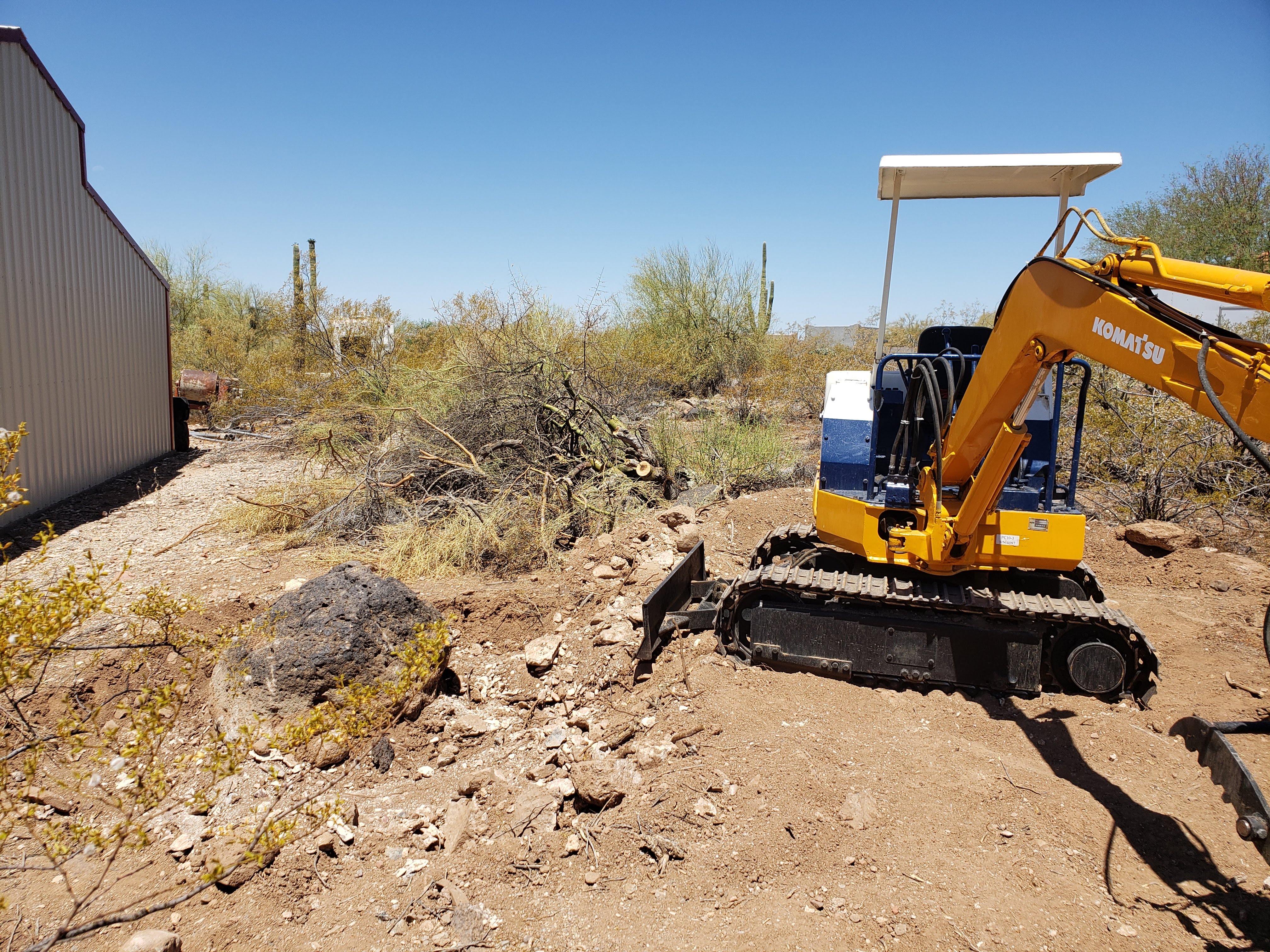


Friday, July 22, 2022

That Youtube Thing, Videos, Action and Stuff Like That

 After I put up a couple videos on youtube, I reviewed them. They were BORING ! Watching someone run an excavator is not nearly as much fun as actually running one. The videos took so much time to watch me flail around the bucket, grab the wrong lever, drop a rock, and dump the bucket in the wrong place, even I stopped them and sighed in disgust.

How the heck do other people get those things to be interesting?

I started looking at heavy equipment videos and tried to get a hint, and one thing stood out glaringly SPEED. See, if you speed up the video, it isn't nearly as visible when you grab the wrong lever and go the wrong way. Speed hides the imperfect and the mistake. Most of the time it even makes it look intentional. Also, putting in stills to show close-ups and examples makes it more interesting because it distracts a bit. 

It seems the key to keeping people awake while watching a video is either cleavage or distractions. People can only watch something for a little while without some change up or excitement. At least it seems that way.

That's why the video I put up in the last post had music and was sped way up. It didn't have stills in it, or other tricks I want to try out. 

I just put up another one to try out some more ideas. This one switches subjects, shows mistakes, and has lots of on-screen text. Voices don't work well when you speed it up, so you have to use that in some way to create interest; I tried that as well.

Can you believe it? I took the chance and bought a new piece of equipment, spent some time learning how to use it a little bit, and then started filming it. What a mess to take on. It's fun learning new things, but this many at once is quite the strain.


Take a look when you have the chance, this is all new to me. 

https://www.youtube.com/watch?v=1eznz2KKoL4&t=120s

Wednesday, July 6, 2022

A Guy I Know Suggested using Youtube

 The title pretty much says it all. I took a camera and recorded using the excavator to do some work on the yard. It took hours and  I encountered the problems we all have with cameras. Soft focus, knocking over the tripod, pointing it the wrong way... You know the drill. 

After hours of recording, I started to respect those Youtube creators even more.

You have to go through the recording, pick the stuff out that makes sense and was actually worth a crap, compose it into something that might be interesting, and then go through the process of putting it online. A whole lot of trouble to convey an idea, but it turned out to be fun.

I see an opportunity here to expand the blog by including other media.

Here's my first effort at this. It's short but represents a heck of a lot of work.


What do you think, is it worth the effort? 

Tuesday, June 21, 2022

So, Have I Actually Done Anything With That Expensive Toy?

Well, yes, but not as much as I would have liked. The 2022 heat wave hit here in Arizona and it was over 110F every day until today. However, today I had to repair my chainsaw instead of working with the excavator.

Sigh....

But I have managed to do some things around the house. I moved a whole lot of rocks out of the way, Built a little road to get around, dug out some brush, and that kind of thing. I know that I'm preaching to the choir here, but tools are great to have. I think I mentioned that I bought it because I was tired of renting equipment and having a multi-hundred dollar bill when I returned it. You can't get good with it only spending a few hours under pressure, and you never quite get the entire job done.

I wanted my own, and indulged myself and bought the darn thing. I don't regret that decision. 

I may be working on this rock for a while. It is stuck in caliche and won't budge.

If you consider following my path, I have a few recommendations:

1. Don't get too big a machine. My Ford tractor is huge and very powerful, but it doesn't fit anywhere. I have to jockey that thing around a LOT to position it for work. Then, when I have to move it, I have to be careful not to take out a fence or something.

2. Excavators are fun and they can pick up heavy things. However, you have to have a thumb to do it easily. You can drag a bucket across the ground and a rock will just slide along avoiding the bucket like it suddenly became sentient and decided not to cooperate. A thumb solves that problem. Thumbs are also really good for picking up brush and moving it. 

There's cactus and thorny mesquite in that bundle !

3. Avoid all the fancy electronic bells and whistles. Sure little short joysticks are fun and cool looking, but the damn things break leaving you with a machine to fix. The electronics on these machines have to be able to take the heat, cold, rain, mud, etc and cost a lot. 

Simple hydraulics are the best for people like me. I want to use the machine, not order parts for hundreds of dollars and wait forever for them to arrive. Hydraulic parts are simple and available all over the place. 

4. Get an older machine. One from the '80s won't have a mess of equipment to lower emissions. A friend of mine had his brand new tractor in the shop for a month to get the emissions equipment working correctly. Avoid that dilemma if at all possible.

Do you really want a DEF reservoir and smog pump ?

5. Diesel may be expensive right now, but it stores well and doesn't explode. Get a diesel engine on your new tool. They run cooler, last a long time, and are already fuel injected. Great little motors that don't plug up with gum from ethanol additives that dissolve gaskets. Remember above where I mentioned having to fix my chainsaw? Yep, the ethanol dissolved the gaskets in the carburetor.

Ethanol is miscible in water. That means it absorbs water
Water damages carburetors. I stole this picture of a really bad one, 
but this CAN happen to you.

6. Educate yourself about the common problems. This is something that you can't get from youtube. People let their machines set outside in the weather and the hoses rot. Hydraulic hoses are not cheap and most of them are custom-made. These things will drive you nuts on a machine that hasn't been used in a long time. If you check back on this blog you'll find where I rebuilt cylinders on the garage floor. It can be done, but that means you're fixing it instead of using it.

For most people, a 4000-pound machine will do everything they want to do with it. It can lift several hundred pounds and move it around. Trailers are cheaper for them. I picked up a used tandem trailer that will carry it just fine locally without any trouble. 

Unfortunately, they can be a black hole for money. There are attachments that can make everything easier, but they cost big bucks. A grooming bucket that lets the dirt go through while the bigger rocks get stuck is great for clearing rocks, but they cost hundreds. Consider digging a hole and scraping the rocks into it with the claws instead. A quick-connect so you can change the buckets easily is great to have, but have you looked at how much they cost? You can pound a different bucket in place for a lot less money. A smaller or larger bucket is great to have, but unless you find one abandoned in an empty field, it's gonna cost you a bunch. Sure you can build one and that would be fun, but have you looked at the price of quarter-inch steel lately? Welders are getting cheaper, but steel isn't. 

I love my excavator and it has made things possible that simply weren't before, but I must discipline myself constantly to keep the urge for a new item for it under control. 

For me, being able to climb up on it anytime I want to and tear out a cactus is exhilarating. Not having to reserve it at an equipment rental place and picking it up at 7:00 AM from a clerk that hasn't had enough coffee is worth a lot. Let's not talk about getting it back on time. That really sucks.

Of course, my yard is starting to look like a used farm equipment lot !


I think it looks great though !


Tuesday, April 5, 2022

My New Excavator

 Yes, I bit the bullet and bought a Mini Excavator. 


I looked at what was available locally for a couple of months, and what I found just didn't cut it. The hoses had rotted from the sun, There was significant damage to some areas, they were way, way overpriced; at least in my opinion. So, I bit the bullet and expanded my search online to nationwide.

There were a lot of them out there, but buying something this expensive sight unseen was scary. Sure, people do it every day at online auctions and such, but they know what they're doing, ... I don't.

So, I went to ebay and looked at their guarantee for construction equipment. They insure the purchase up to $100,000, and that gave me enough courage to contact a seller. The rest was easy. The excavator arrived in port in Long Beach, CA; was inspected; loaded on a truck, and showed up at my house in just a few days total time. I was lucky in that respect, but I did choose a machine that was available instead of looking for exactly the right thing.

If you want to know the specs, the model number is right on the side and google can pop up a spec sheet in one search. What I like most about it is there ARE NO ELECTRONICS; it's old school hydraulics with valves and such. It can be worked on without a laptop plugged into a data port. Less failures to some component getting wet and less expensive control components.

I can fix it if I need to. (or should I say 'when')

Now the bad stuff: When I got on it, having exactly zero experience on an excavator, I couldn't get it to go. Meaning, how the heck do you run this thing? I fiddled around and found the two forward controls for the tracks and managed to move it down the drive a ways. Then I looked at the control layout decal and managed to work it a bit. I got it from the road to my house in a few minutes and then started to play with it where no one could see me make a fool of myself.

After an hour of trying levers, looking at the instructions (shudder) and messing around I managed to make it do things. Then, I went nuts. Spinning around using zero turn, swiveling it around and around, banging the bucket on the ground. Basically playing with my new toy. 

It is so exciting to pick up a bucket of dirt, swivel around and dump it behind you. That is probably the most exciting thing about an excavator I've tried yet. It can really dig!! I can make a hole in no time, even with the incredibly rocky ground I live on. Just wiggle the bucket back and forth a little and it will bite in. Really large rocks give it trouble, and I have to plan better to roll them out of the hole, but so far, I haven't hit one that I can't move. I know I will at some point (it is a mini machine), but then I'll just go around the rock if necessary. 

And, it has a THUMB. In case you don't know what that is, here's a picture of mine.


This allows me to pick up rocks, grab a bunch of prunings, pick up a limb to chainsaw, etc. It gives me a hand to manipulate things with. This increases the versatility of the machine to a level that we, as homeowners, can really appreciate.

There is one annoying thing about it though. The left hand control is set up counter-intuitively. Left hand left is stick away and left hand right is stick close. Left hand forward is swing right and left hand back is swing left. There are two control standards in the US, ISO and SAE; they differ in the positions of the controls, however both of them have the swivel control on the left hand side to side.  That is driving me nuts. I keep swinging the excavator when I try to move the stick. It just makes sense to my brain that swivel left should be push left, not pull back.

Yes, it can be changed by moving the hydraulic lines. However, the lines are plumbed, not hoses. Take a look:


Those two pipes are the stick controls, and I didn't want to spend a week creating new ones to fit the application. Note that steel plumbing is a good thing, it protects the hydraulics and makes for a really good connection, They are just really hard to move around. I may come back to this after a while and change it, but reprogramming my brain is easier at this point and it keeps the machine on the dirt doing what I need instead of sitting in the garage waiting for parts.

What's also awesome about this machine is how well it is set up. I can get to the controls really easily, the gas gauge is a clear tube instead of a float in the tank that fails, the horn is not where you'll hit it every time you use the machine. It even has a light that I plan on using very, very little. 

For example, the horn used to be on the right hand control where you manipulate the bucket and bang your knee. It's now on the right hand side where the other electrical controls are:


I may grind that mount off at some point, but want to have a can of Komatsu blue paint on hand when I do to keep it pretty.

Wanna see the extremely high tech fuel gauge? I guarantee this will not fail due to a rat eating the wiring or some connection coming loose.


Yes, it's just a clear tube that shows the level of fuel in the tank. No electronics, no silly idiot light, just something that you can easily see that won't fail as soon as you need it.

Now for a blatant recommendation of the seller I used for this transaction, NGO Company. I called them about the excavator I found both on the web and ebay. I talked to a guy named Ray, and he was totally honest. He described the machine, the process of buying it and when he expected it to show up in port. I waited a day, and called him back to start the purchase process. I paid a deposit, then waited until the machine was in his shop. He sent me pictures of it and I paid the rest by wire transfer. 

As soon as the wire showed up as pending for transfer, he called the shipper and they came and loaded it up. I got it the next day. 

Totally seamless transaction; nothing went wrong and the machine started on the first try. How good can it get?

Ray will probably read this blog post and snicker a bit because I literally drove him nuts with questions about the dates, how wire transfers worked, etc. All the stuff a naive purchasers comes up with. I was basically a total dweeb, and he put up with it.

If you're interested in something like this, visit his web site at https://www.ngollc.com/ and tell him Dave sent you. You won't get a discount, large equipment doesn't work that way, but he'll recognize the name.

I'll be posting about my exploits with this machine in the future. It's too much fun not to spend time on it.